
 Media Stream Solutions
 Gaming Solutions
 E-Commerce Solutions
 VPN Server Solutions
 GPU Server Solutions
 Financial Solutions
 Security Solutions
Let’s do some quick math. It might make you uncomfortable.
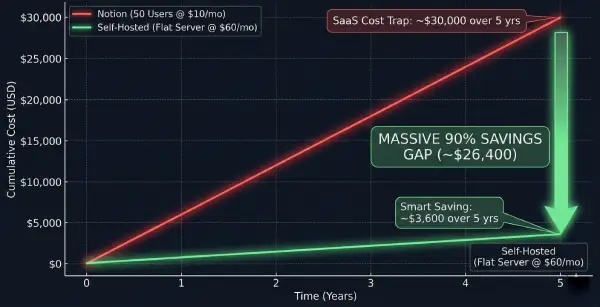
Are you currently on a standard business plan for Notion, Confluence, or a similar SaaS knowledge base? That is usually around $10 per user, per month. If you have a growing team of 50 people, that’s $500 every single month. That is $6,000 a year just to host your own internal documents.
For many businesses in 2026, that math no longer makes sense. We are entering the era of "SaaS Fatigue." Companies are realizing they are renting their own data at premium prices, often facing sluggish performance and worrying about whether their private documentation is being used to train public AI models.
The trend for 2026 isn't buying more subscriptions; it's taking control back. It’s time to look at powerful, self-hosted alternatives like Docmost and Outline Wiki.
The Great Migration: Why Leave the Cloud Giants?
Besides the obvious cost factor, why are companies moving away from giants like Notion towards self-hosted solutions? It comes down to two critical factors: Data Sovereignty and Speed.
1. Data Sovereignty (The AI Concern)
When your data lives on a shared public cloud, you rely on their privacy policies. In 2026, a major concern is Generative AI.
Are your proprietary business strategies, client lists, and internal notes being used to train a vendor's AI model? When you self-host open-source software on a BytesRack Dedicated Server, your data lives on your hardware. It never leaves your encrypted environment.
2. Blazing Fast Speed
SaaS tools are often bloated "do-it-all" platforms running on shared resources.
When thousands of companies hit Notion's servers simultaneously, things slow down. Self-hosted alternatives run on dedicated hardware that only serves your team. Searching through thousands of documents becomes instantaneous.
Cost Comparison: Notion vs. BytesRack (2026 Reality)
We compared the standard Notion Business model against hosting Docmost on a robust BytesRack Dedicated Server.
| Feature Category | Notion (Business Plan) | BytesRack Self-Hosted 🏆 |
|---|---|---|
| Monthly Cost (50 Users) | ~$500 / month | ~$60 / month (Flat Fee) |
| Annual Cost | $6,000 / year | $720 / year |
| Data Privacy | Shared Cloud (Risk of AI Training) | 100% Private (Your Hardware) |
| User Limits | Pay per seat. Costs grow as you hire. | Unlimited Users |
| Performance | Variable (Shared Resources) | Blazing Fast (Dedicated) |
The Verdict: By switching to self-hosting, a 50-person team saves roughly 90% annually ($5,280 saved per year).
Meet the Contenders: Docmost and Outline Wiki
If we aren't using Notion, what are we using? The open-source community has stepped up with incredible alternatives.
Docmost (The "Notion-Like" Experience): If your team loves the block-based editing and databases of Notion, Docmost is the strongest contender. It is designed for real-time collaboration without the hefty price tag.
Outline Wiki (The Clean Speed Demon): Outline focuses purely on being the fastest knowledge base possible. It has a minimalist interface, amazing markdown support, and lightning-fast search.
The "Under the Hood" Reality: What Specs Do You Need?
Can't I just run this on a $5 VPS? No. Modern knowledge bases run on Docker containers with heavy databases (PostgreSQL) and caching (Redis). If you starve them of RAM, they will crash.
| Component | Minimum (Start) | Recommended (Production) | Why It Matters? |
|---|---|---|---|
| CPU | 2 Cores | 4 Cores / 8 Threads | Handles multiple users editing simultaneously. |
| RAM | 4 GB | 8 GB - 16 GB | Docmost uses Redis for caching. More RAM = Instant speed. |
| Storage | 40 GB SSD | 100 GB+ NVMe SSD | Space for high-res images, PDFs, and videos. See our High Performance Specs. |
Important Tech Note for Outline Users: Unlike Docmost, Outline Wiki requires S3 storage. Our dedicated servers are powerful enough to self-host a local MinIO instance alongside your wiki, keeping everything 100% on your own hardware without paying AWS.
Final Verdict: Stop Renting, Start Owning
In 2026, paying exorbitant per-user fees to rent software that holds your own data is becoming obsolete. The open-source tools are mature, and the cost savings are undeniable.
If you value data privacy, want lightning-fast documentation, and want to reduce your software overhead by nearly 90%, the path forward is clear.
Ready to build your own private headquarters? Don't settle for a slow VPS.
Recent Topics for you

GPU vs CPU Dedicated Servers for AI Inference: Which Do You Actually Need?
Discover whether your AI inference workloads need a GPU or CPU dedicated server. Compare VRAM, TTFT, costs, and performance for 8B to 70B+ LLMs.

The GPU Sizing Guide for AI Agent Workloads on Dedicated Servers
Learn how to calculate exact GPU VRAM requirements for AI agents. Understand quantization, KV cache sizing, and choose the right dedicated server.

Why Los Angeles is the Ultimate Server Location for Cross-Pacific Gaming
Discover why Los Angeles dedicated servers provide unmatched transpacific low latency for gaming. Bridge US and APAC players with Tier-1 routing.

The London Advantage: Why UK Dedicated Servers are Vital
Discover why London dedicated servers are essential for global finance and tech. Explore ultra-low latency, UK GDPR compliance, and Tier-1 network benefits.
Ransomware Defense in 2026
Prevent ransomware in 2026 with isolated dedicated servers. Learn why bare-metal and immutable backups beat cloud storage for enterprise data security.

The Rise of Geo-Targeted Dedicated Servers for IoT
Explore why global enterprises are shifting to geo-targeted dedicated servers to eliminate latency, ensure data sovereignty, and power real-time industrial processing

Why Massive E-Commerce Stores Need Dedicated Servers
Find out why massive e-commerce stores need dedicated servers to scale. BytesRack explains how bare-metal stops downtime, cuts cloud fees, and boosts speed.
Why Low Latency Dedicated Servers Are Faster Than Your Workstation
Discover why professional studios are moving 4K/8K video editing to low-latency dedicated servers in 2026 to bypass hardware bottlenecks and thermal throttling.

The Rise of AI-Powered DDoS in 2026
AI-powered DDoS attacks are evolving faster than legacy firewalls can adapt. Discover why standard hosting is failing in 2026 and how enterprise-grade, unmetered DDoS dedicated servers can keep your infrastructure online.

Why Your Server Location Matters: The Singapore Advantage for APAC Speed and SEO
Need to serve the APAC region? A Singapore server location provides the lowest latency. Learn how proximity boosts your site speed, Core Web Vitals, and SEO rankings.

Why MCP Servers Belong on Dedicated Hardware?
Discover why Model Context Protocol (MCP) nodes require dedicated hardware to avoid the 2-second Cold Start bottleneck of serverless functions.
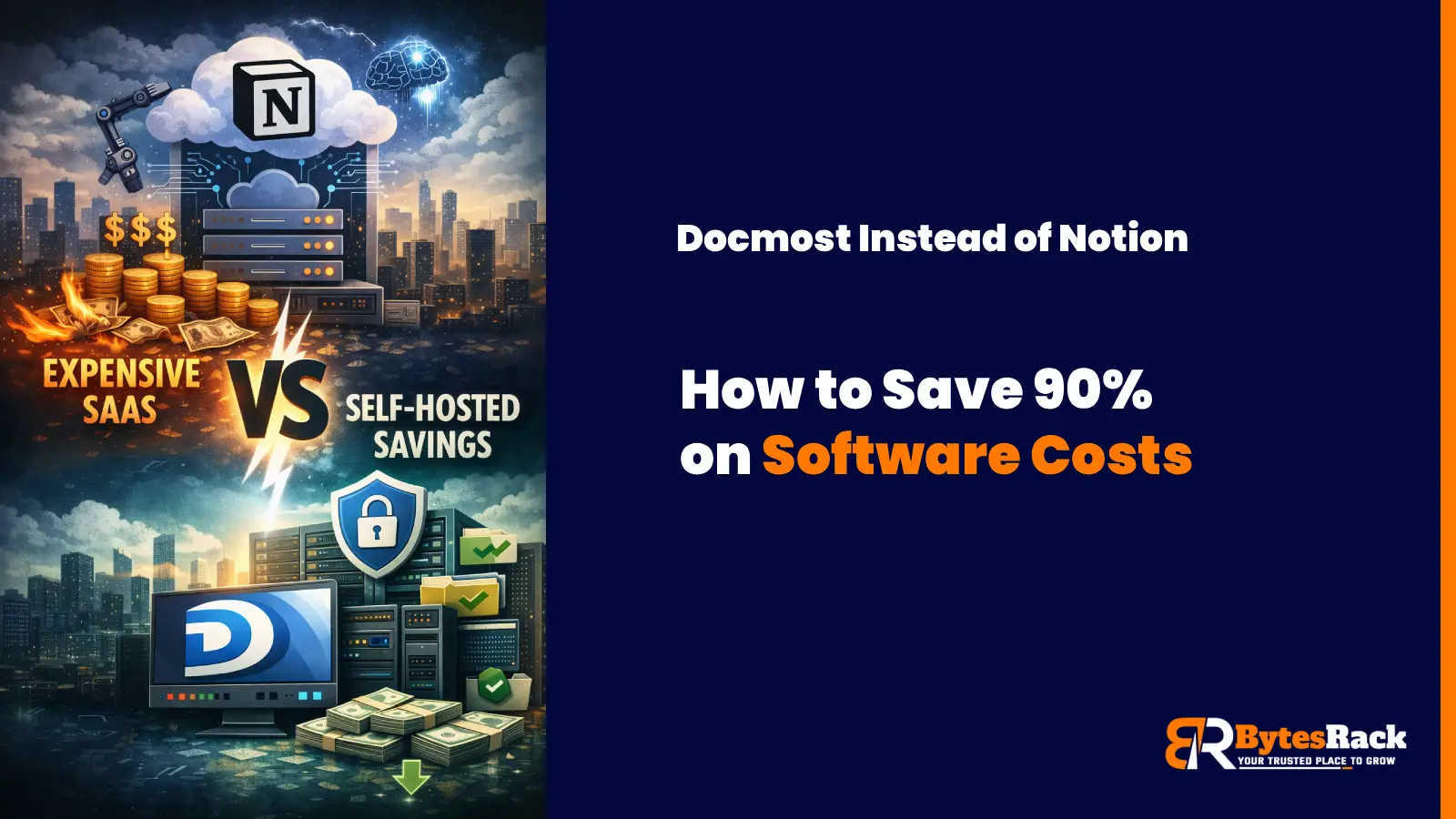
Docmost Instead of Notion:How to Cut Your Costs by 90% in 2026
Stop renting your data. Discover why companies switch to self-hosted Docmost and Outline Wiki on BytesRack dedicated servers to save 90% and regain privacy..
Cloud GPU vs. Dedicated GPU Server
In 2026, the smart move for AI startups and high-performance gaming communities isn't the Cloud; it's Dedicated GPU Servers.
Power Your Business with a Toronto Dedicated Server
Learn how Toronto's unique submarine cable gives our dedicated servers a speed advantage for serving Canada and the US.
The Miami Advantage:Why Your Dedicated Server Belongs at the Gateway to the Americas
Discover why a Miami dedicated server is your secret weapon. Get unrivaled low latency to Latin America & the US. Unlock strategic growth today.
Why Your Business Needs a Tokyo Dedicated Server from BytesRack
This guide will explore why Tokyo is the undisputed strategic hub for APAC and how BytesRack's dedicated servers provide the power, performance, and reliability you need to dominate the market.
Gain the Ultimate Edge: The Power of a New York Dedicated Server
Discover why New York offers the ultimate hosting advantage. Unrivaled connectivity to US & European markets
Why Germany Is the Best Location for Your Next Dedicated Server?
Discover why Germany offers the best hosting. GDPR compliance, ultra-low latency via DE-CIX Frankfurt, and enterprise-grade reliability.

Which Web Hosting Control Panel Should You Use?cPanel or Plesk
In this blog, we’ll break down the differences between cPanel and Plesk, helping you decide which control panel suits your hosting environment and technical needs best.

How to Restore SQL Server Databases Using SSMS
Learn how to restore MSSQL databases using SQL Server Management Studio (SSMS) with expert tips and best practices.

The Ultimate Guide to Dedicated Servers for Streaming - 2025
Boost performance, reduce buffering, and scale with confidence. These expert tips help you optimize your dedicated streaming server for speed, security, and seamless viewer experience.